I believe the contacts list you’re referring to is generated by AirDrop based on nearby contacts
The 12 year old girl across the street who helps me walk our dogs on a regular basis (hence why she's in that bar), whose father works for Google, and has an Android phone is most certainly not showing up due to AirDrop when I'm in my living room.
And I'm with parent comment: I DO NOT WANT 12 year old girls to be one accidental button push away from inappropriate content. Hell, I don't want to explain to my bluegrass pickin' buddies why I sent them an Ikea link, either.
Only one of the settings is limited to contacts; AirDrop can also be set to find “everyone”, which probably uses WiFi Connect or some other trickery to locate nearby devices even on other platforms.
I have it set to only contacts. I'm looking at the share sheet right now: there is no one in that list that is within WiFi range. My wife: at work in Redmond. Dog walk girl: at school, in Redmond. My mother: 3000 miles away in Florida. My bluegrass pickin' buddies..., oh, you get the point. Me: at work in Bellevue, WA.
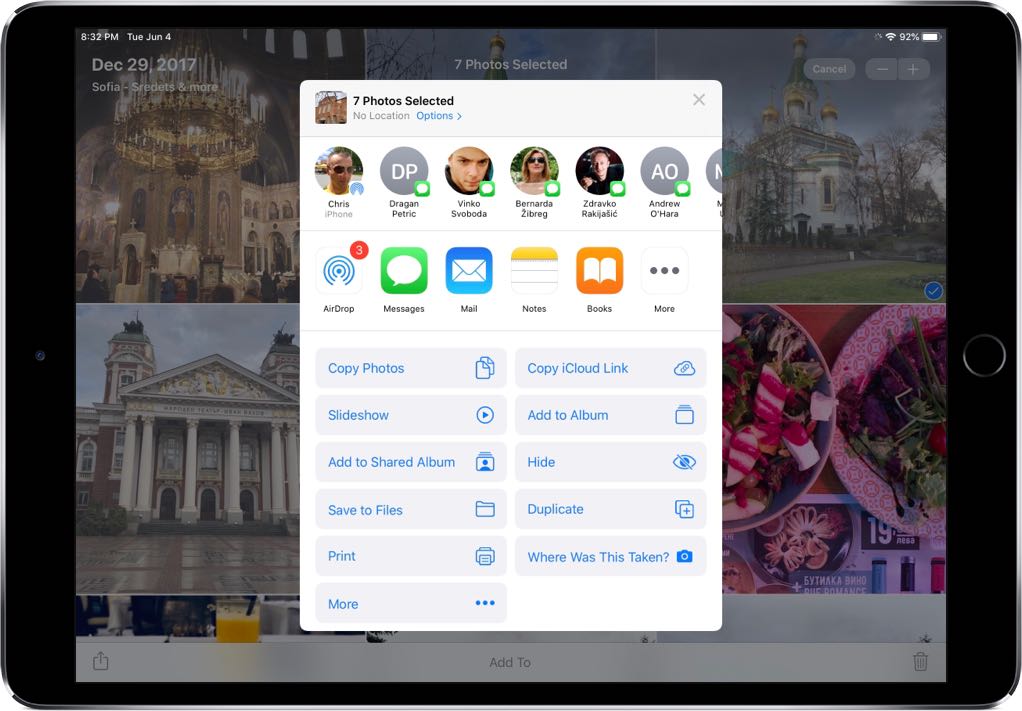
But you prompted me to remember: "Aha! AirDrop uses a different icon than what I see right now!" Observe the following:
Note the contact on the left, and icon: it's the AirDrop icon. But the rest have a Messages icon. That, I'm assuming, comes from contacts I've recently messaged and has nothing to do with AirDrop. I could have my phone on airplane mode, and those still show up.


The 12 year old girl across the street who helps me walk our dogs on a regular basis (hence why she's in that bar), whose father works for Google, and has an Android phone is most certainly not showing up due to AirDrop when I'm in my living room.
And I'm with parent comment: I DO NOT WANT 12 year old girls to be one accidental button push away from inappropriate content. Hell, I don't want to explain to my bluegrass pickin' buddies why I sent them an Ikea link, either.