The main body text is Courier, and the titlebar text is generally called "CCSID 437" or the OEM font. Both standard IBM fonts from the era. They're not the same fontface.
WordStar had full support for the PC-8 Graphic set. It is pre-TrueType Fonts, but so was the software. By the time WordStar landed on Windows, it had support for everything you'd expect from anyone else.
Honestly, I do not see the different fonts in the image. I see the status line showing the Courier font name. If it is different from the body text, I cannot distinguish it.
Obviously WordStar was limited by what DOS could render, so the variety of fonts available had to work in a drastically constrained bitmap. I could also not find samples of the PC-8 graphic set.
But for comparison, here are the original 1984 Macintosh system fonts:
Okay... Let's try a different approach here. "DISPFONT.EXE" and "DISPFONT.OVR" are key files you'll find in WordStar's archive [0].
I don't have a CP/M emulator on hand to fire up the original to show you an example, as WordStar pre-existed DOS.
But this is a quote from v3, the first DOS version, from the manual:
---
Screen Fonts for Preview
At the Add or Remove a Feature screen, you can install three
different types of screen fonts for Preview. The screen font
options are Code page 437, Code page 850, and PostScript fonts.
If you want to install PostScript fonts, install both PostScript
and code page 850 fonts. (Be sure to set the code page to 850 in
DOS. See your DOS manual for instructions.)
Hi, actual WordStar-in-practice, wrote several hundred thousand words on it in both CP/M and DOS, user here (related: I am old). I think you're confusing WordStar's preview display with its editing display here. Later versions of WordStar for DOS (I think it started with version 5.0, but I wouldn't swear to it) could generate a surprisingly good for the day print preview using PostScript fonts, as described above in the text you're quoting. But that was a specific read-only mode. When editing, WordStar ran in DOS text modes and was limited to what DOS text modes were able to display: monospaced fonts, usually with the ability to display boldface text with "bright" text and sometimes -- not always -- with the ability to display underlined text with actual underlines. (This depended on your video hardware; IIRC, XyWrite seemed to be able to do that pretty reliably in DOS, but WordStar didn't). But you couldn't display proportional type in editing, or italics, or different typefaces.
Now, you could argue that WordStar anticipated WYSIWYG editors, because it did its best to faithfully reproduce margins, indents, line spacing, justification, etc. in its text editing mode -- but that attempt came from the era when printers could only output monospaced type, usually just one typeface, no italics, etc. Once printers got better, WordStar really wasn't WYSIWYG anymore, just "best effort within limitations". IIRC, the only major DOS-based word processor to actually attempt a WYSIWYG editing display was WordPerfect 6.2 in the late 1990s.
Thanks for this. I've never used WordStar, and my knowledge of early word processing software is certainly incomplete, but this is the first time I've seen such a screenshot that predates 1984.


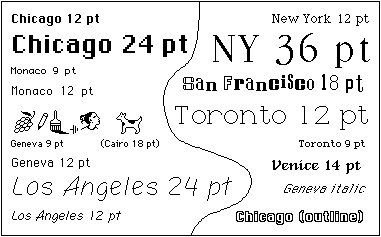
The Macintosh system software shipped with about 12 distinctly-different fonts. Most of which also had italic, bold, outline, etc styles.
These fonts could also be rendered at different point sizes.