I agree with a lot of the points raised here. I think many of the problems with spreadsheets are due to the software rather than the users. As mentioned in the article, its hard to slowly iterate from a small manageable spreadsheet to an larger software solution.
For example, Excel would be a lot more usable and maintainable for me if there was a way to make a special "data sheet" in which data types are forced to be consistent within columns and there was a concept of column names. Still GUI-based and user-friendly. That would encourage a logical seperation between data entry, data output, and computations. In my experience, the main challenge of helping users with spreadsheets is when they create spaghetti code that mixes data and computation together.
Tables are probably the most overlooked feature of Excel.
Why use tables?
* Each column is uniquely named - no more wondering if you are referencing the right cell, no more thinking about "to $ or not to $"
* The table's rows and columns are reliably discovered by pivot tables - no more wondering if the entire dataset is referenced by the pivot
* New columns that are formulas are automatically applied to every row
* Tables have names, so it is easy to understand which table a pivot is referencing
The true, reliable and sane power of excel lies in Tables + Pivots + Charts. If you drive most of the problem solving into those paradigms you will keep hair!
Most people have no clue these features exist, or that Excel even has advanced data modeling that supports all sorts of goodies including strict types and joins/merges/appends. It's not as accessible as just basic sheets, but I've had no problem crunching millions of rows of data in Excel with sub-second response times.
Excel 2013 and later has a columnar database capable of handling millions of rows, but not through the standard sheets interface so it loses a lot of the utility people are used to.
Yes, although you can have multiple sheets each with a million rows. Kind of like sharding.
But I’d be fascinated what kind of system spec is required to get good performance on those kind of numbers. I’ve been on a Mac for years, where Excel is crippled by limitations.
Tables have that all-too-common symptom of something that makes easy things even easier, but hard things way harder. Try making a table with a formula that involves more than the single row in which it's placed. What about tables with multi-row headers (e.g. title and units)? Section breaks in them? Merged parent data? I find I either want standard Excel layout, or a database. Tables don't really sit "between" those two; they're just their own extremely over-simplified universe that doesn't play nicely with anything else.
But hey, to each their own. Good on ya if Excel tables are what you need.
This, combined with judicious use of named ranges makes for much more pleasant formulas. Seeing `tax_rate` in the formula instead of `A$7$` is well worth the extra clicks.
I usually end up assigning names to nearly everything, single-cell constants, user input fields, computed lists, etc, etc
About tables, do they work when you automate the data entry part? For example, copy from a speadsheet into your spreadsheet with the first macro, and then transform the data with a second? That's 90% of my use case for Excel. (I know that doing this in Python/whatever would be "better" but I have to distribute this to users, and the only thing they have on their computer is Excel, and they're gonna manipulate the data after in Excel anyways).
I think Libreoffice Calc supports python integration. Maybe that way one could have the best of both worlds. Unfortunately I suppose most users are stuck in the MS garden.
On the one hand, it is great for doing a quick and dirty analysis with data not in a DB, on the other, it mangles data and translates the keywords/function names.
> For example, Excel would be a lot more usable and maintainable for me if there was a way to make a special "data sheet" in which data types are forced to be consistent within columns and there was a concept of column names.
- column naming: https://smallbusiness.chron.com/give-name-columns-excel-7344... (you can name individual cells and ranges too. Which means you can actually start to write formulas that look more like C with name variables, very loosely speaking of course)
There's a surprising amount of hidden functionally in Excel. Personally I think that while ribbon bar might have made core features a lot easier for some, it's made a lot of the more advanced tools harder to discover.
I've had similar thoughts in the past. Databases are very machine-friendly, but too static and inflexible to match the usability of spreadsheets. Spreadsheets are extremely user-friendly, but too inconsistent and unconstrained to be efficient for programmatic access.
It seems like there should be a way to combine the two. Maybe a minimal set of optional constraints (like a separation between data and code) like you proposed would be a good starting point. Make tables a first-class citizen backed by an embedded SQLite database (or something similar); let users write real SQL to query tables in formulas, maybe update the file format a bit to make it easier for programs to parse and access concurrently. Could be an interesting project...
Honestly, what's missing is a GUI builder for Postgres that non-programmers can use.
Others have mentioned Filemaker and Access, and I think that's exactly right - non-programmers can understand datatypes, that's not the issue. The issue is a UI they can use and (more importantly) iterate on themselves.
One of the major strengths of spreadsheets is "touchability" - your stuff is right there. Psql is the opposite - nothing is visible without the right incantation, and non-programmers can't do much about that.
This article is dead on from an analysis/criticism/insight: devs are called in when it's a sinking ship and don't see all the cargo the ship has hauled.
Why hasn't microsoft or someone taken the basic spreadsheet model to a shared-database scalable one? The UI is basically set at this point.
A naive schema (filename, tab, x, y, value) is what an excel sheet is. It's not like we are dealing with "impedence mismatch" and even shared editing can be reasonably handled with database transactions (or RAFT if you want to get really big/distributed)
I think the lack of this is a sign of Microsoft Office completely owning the space and not wanting to innovate at all. And the huge amount of effort it would take to replicate excel-level operations in a database application server is nontrivial.
But man, you could have an API for doing excel operations against a database schema, and export to excel...
And as you said, you could do lots of schema based options in databases that aren't natural to excel.
How would you put guardrails on the spreadsheets to make sure spreadsheets do not accidently damage the database performance through bad calls? In the hierarchy of skills, SQL is significantly less prevalent that spreadsheets.
Excel data is usually on a scale that DBs have no problem with, even doing full table scans. I am assuming this for something that starts life as a spreadsheet, not a database first where the sheet is initialized via a query.
Perhaps you could come up with a list of commonly-used functions and write optimized SQL functions for them, such that users start off learning with that API and gradually learn SQL when they're more comfortable.
There is so much excel voodoo involved to do things with that software. I still believe that the learning curve of excel is no harder than the learning curve of doing the same exact thing in R or python, plus you'd end up having the data and the formulas in different places which brings loads of benefits (for instance, git). People are just familiar with excel because thats what they used to make a chart in science class in 7th grade since 1995, but they really could have learned to make the same chart in 7th grade with a language like python too, if it were only taught python instead of excel in school. And then we'd have a generation of workers fluent in a language like python rather than fluent in the very limited use case by comparison Excelese, and we would no doubt reap the benefits in our GDP. Its like we are limiting the knowledge of fire among our tribe when we don't really have to, it's perfectly learnable.
Return on investment, essentially a zero barrier to entry, and immediate gratification, and it's wildly flexible.
It takes about 10 minutes to learn the basics a spreadsheet, and what you get back is immense.
You couldn't get python up in running in 10 minutes, then you need to learn the language, the syntax, and how to structure a program, frankly I'm tired just starting to type out what needs to happen even before you can do *ANYTHING*.
Some people can get YEARS of productivity from those first minutes with a spreadsheet. The return on that initial 10 minute investment justifies spending more time to learn the more esoterica aspects of a spreadsheet, but even then, most people don't want to be bothered with learning how to "program".
Why do so many people start playing guitar/piano/drums/etc, but so few finish? Because it requires a significant up front investment, no immediate gratification, and a long, slow return on that significant up front investment, learning music is somewhat flexible, but you need to be highly skilled in order to exploit the flexibility.
Python is preinstalled on macs at least, that's a decent chunk of personal computers. You have to pay for excel. And you don't need to bother with virtual environments to fiddle with a flat file.
I think an important part of the battle for attention is that excel is visible as a GUI that inexperienced users can open from an icon and see and manipulate. A simple GUI utility with Python input in one pane and data input in the other might put them on more equal footing.
I was going to say that I have a small, very limited amount of experience with MS Access. I agree; the middle ground between Excel and databases sounds very similar to Access.
We had been using Excel for org charts like most places. We wanted to add grouping, metadata, and neatly be able to extend/add information with or without constraints. This was much before I knew anything database related, and Access seemed to be more powerful than Excel. Having generated forms to fit the data model was much more user friendly and a lot less error prone than adding a new row to an Excel sheet.
People criticize Access for being a dumb database or a Excel with too much heavy lifting. It occupies a specific space as a DB on rails.
I was mostly being glib, but I've had some bad experiences with Access over the years. I actually think lightweight database and scripting utilities in Excel could be good, but it would be susceptible to some of the design traps that Access steps on.
What are the biggest design traps that Access fell into? If someone were rebuilding spreadsheets with more structured design like Access, what should they avoid?
I think Airtable is starting to get us there, but it's a long way to go.
Something that combined Airtable, excel, and maybe a more userfriendly (and more restricted) version of darklang for defining formulae could be really slick.
Airtable is pretty, but lacks simple functionality that spreadsheets have had for 30 years (like aggregates across rows). Airtable is more of a replacement for Access than Excel.
Airtable is a great example of what I would like to see. Basically, the ability to create sheets that are are like airtable-like that users can reference as usual in other general-purpose excel sheets.
Excel has, IIRC, had data validation longer than it has had tables (even if you count the time before Excel 2007 when tables were called lists),and its had both (with the same inclusion) for >20 years.
I'm not sure about type enforcement, but there is the concept of "named ranges" you can apply to columns. So instead of C1:C99 you can refer to PRICES.
One aspect that is rarely talked about is that Excel is really good for developers who know about data/stats/business/databases but don't know about frontend app development.
Excel thrived in banks, not because traders used it, but because IT/Quant people used it. It's so much more straightforward to build a UI in Excel than with React. Just type things in cells, then wire them with simple VBA buttons. Of course there are things you can't do, but for the purposes of a bank, it's very rare that you find one.
So if I am a quant, I don't need to go to the frontend guy, trying to explain to him what a "vega" is and why I would want to multiply by notional/vol to change the units. This is a huuuuge time saver. And you can change your UI anytime. Just open the file, add a column, click save and it's done.
At some point, banks knew that fat-finger-mistakes could cost them fortunes, and the lack of auditing was terrible. But they had to force traders to switch off their sheets by threatening them with internal fines (we'll charge you $2m for running things with Excel). So traders complied, but then they got into years-long projects, to create shitty shitty web apps, that couldn't do half of what Excel had built-in. Every change would need to go through an approval process, and it's unclear whether these systems had less bugs than spreadsheet did.
The first thing they wanted when the project was done? "Give me a button to export to Excel".
For the shameless plug part, I am building a tool to try and bridge code and spreadsheet (https://www.jigdev.com). Lmk if you have comments/suggestions.
Any plans on open sourcing? I'm tired of apps changing until my use cases are not covered anymore, so I'd like to future-proof my usage of tools, and open source/free software seems to be the only way to make that work in practice.
Honestly I don't know what I am going to do with this. Right now, it's very early beta. If I can sell it to a few thousand people, it's unlikely that I am going to open source it. If I can't, then I may open source it, though I probably won't maintain it...
Read "this is not a passion project, this is something I would like to make a living of."
This article is BS. As others have noted, it is a straw man argument.
Everyone uses spreadsheets, including developers. I use them. I'm not going to spend 50 hours coding when I can create a spreadsheet in 5 minutes.
Of course, the issue is when things get complicated, as the author and others here have noted.
Creating a CRM from spreadsheets is pure madness, for example, when there are so many other options that exist, without having to custom program.
For me, whenever you have a one-to-many or many-to-many situation, that's where spreadsheets, to me, fall apart.
I personally have used spreadsheets to do my finances, but only because I was too lazy to scope out different bookkeeping systems. I'm fairly expert in accounting, too. I've used a LOT of different accounting systems, and installed and trained people on them. But there's no way that one can get up and running as fast as one can by using Quickbooks or other accounting systems, in terms of all the report features, etc.
Pre-defined apps are fairly unchangeable, but unless one has critical information that depends on a custom solution, it's better to shoehorn your business into a pre-existing app. I do admit that. Very few small and medium sized businesses require that, though, I've never seen one yet that can't use a prior existing solution. Though there might be, but only very, very small percentage, like, less than 1%. However, a large Fortune 1000 enterprise could have stuff they need custom programming, because of the scale. But I don't have any experience with enterprise organizations so I can't comment on that. Maybe SAP or whatever is good for them, I don't know.
Can't disagree. Spreadsheets are incredibly powerful tools and the barrier to entry is very low.
The only situation I can think of where you should discourage their use is in those situations where you know for sure in advance that the application is going to outgrow the spreadsheet very soon and/or immediately. If you are building a new microservice that will serve a million customers per day, don't make the mockup in a spreadsheet.
> Can't disagree. Spreadsheets are incredibly powerful tools and the barrier to entry is very low.
Agree!
> know for sure in advance that the application is going to outgrow the spreadsheet very soon and/or immediately
Hard to agree, what does "outgrow" mean here? Spreadsheets can handle very big use cases, with lots of data and still be useful, if you take care when building it (similarly to programming)
> If you are building a new microservice that will serve a million customers per day, don't make the mockup in a spreadsheet.
Hard disagree. Mockups are for prototyping/experimentation, so it hardly matters how you do them, as long as you throw them away before starting the main implementation (this throwing away tends to be the hardest part).
If you have had to fill multiple, spreadsheet-based, customers' InfoSec questionnaire about your SaaS product, including the need for tailored, multi-paragraph answers (ie: you can't copy/paste from stock responses), you might disagree with the raw headline.
And when you have an answer that exceeds the height of the tiny cell, you can't turn on "Wrap Text Automatically" so you can see the content -- because they've locked any changes to the sheet structure.
There's a real back-and-forth struggle for me with spreadsheets. I find people very frequently reach for them for things that they do really well: data slicing and dicing, ordering and sorting, formulae that cross-reference cells, and so forth. However, the contents of those spreadsheets are often (for me) not numeric, but text, and working with text that's longer than a few words in Excel is still a huge PITA, even after all these years, because Excel still thinks of the contents of cells as numbers first.
Consider the output of your average audit. You'll have tables of findings, each of which needs a due date, a risk rating, a description of the problem, a description of the solution, auditor notes, customer comments, responsible party assignments, and so forth. (Yes, those would eventually go well in a tool like Jira, but that's for later--this is coming out of an audit visit.)
From a data standpoint, putting those in a spreadsheet makes sense: you can now order the findings by date or risk rating, hide ones that don't apply, cross-reference findings between visits, and so forth. However, from a text perspective, it's awful: the descriptions might run to multiple paragraphs, comments and instructions need more complicated formatting than just "bold or italic", some fields should be constrained on content while others need to be free-form, and so forth. All of those things work much better in a Word table than in Excel cells, but putting the content in Word utterly removes the ability to data-manipulate. So you wind up either creating some Frankenstein hybrid solution or with crushing one perspective to satisfy the other.
If Microsoft wants a win for Excel, making it an order of magnitude easier to deal with free-form text in cells would be an enormous step forward.
This would be great - I find people reach for excel out of familiarity when they need to keep track of textual information like tasks, issues, risks etc. Semi-structured data with a lot of text and not a lot of numbers can quickly become unworkable in excel. If the whole OLE thing had worked out things might be easier - being able to mix the data-wrangling of excel with the content manipulation of word would be awesome.
A really simplified version of access that works from one underlying spreadsheet as a data source perhaps?
We need a spreadsheet format that's more conducive to the professional programmer workflow.
Parsing them is actually very complex. You just have to hope your library can handle everything in excel. If you're a cli native I'm not really sure what you do.
Spreadsheets don't play very will with source control. If the underlying format was text and every cell and formula was on a new line it would work out ok. As it is now, merging them is very cumbersome....impossible for the laymen that might be the main user of the sheet.
By going with a speadsheet and not something like SQL, you lose a lot of rigor.
There's probably a few more needs but these are top of mind for me.
Look at what the UK tried to do their contact tracing program through an excel file. They ran in to problems at 80,000 entries because excel has limits and the whole thing fell apart during the peak of a pandemic. Spreadsheets are not Databases so don't use them as such -- thus "spreadsheets everywhere" isn't a good principal.
That's the thing. It "works" just as long as filesize is under 200 MB, you don't need complex joins/queries/constraints and you don't make/allow for manual mistakes.
Suddenly out of the blue it doesn't work anymore. It's fine given you stay within scope and don't rely too much on it.
People understate the power of spreadsheets. You are literally using a visible programming language. When I have to write a algorithm to read from a file or a spreadsheet, I can model it very easily on the spreadsheet to get all my i's, j's, and k's right, and I can watch it occur incrementally line by line in a spreadsheet. When I was buying my house, I was able to easily line by line show my wife where all the cash was going. No print statement, variables, or anything I'd need in Python or C++. I could do it in 5 mins and it was as good as anything those languages could have done.
All that said, I can see issues with errors that are hidden by spreadsheets but those can be handled with good spreadsheet design (i.e. NEVER EVER hard code anything into a cell) and they simply just need a way to do GIT type version control natively. We recently got the ability to have multiple people work in the same spreadsheet at a time if on MS Teams, but there's more work to do there.
> (i.e. NEVER EVER hard code anything into a cell)
Define 'hard code'...
Is "=MONTH(A1)+2" no good when I'm trying to write a row of every other month?
Is it bad to say '=IF(A1="USA",TRUE,FALSE)' when I'm trying to see what customers belong to our USA office?
I have this problem with coding too. In my mind, it's okay to hard code things, since you can always debug and abstract them later. Excel's "Evaluate Formula" and "Trace Precedents" are both pretty handy tools.
I'm actually the other way around. While visualizing algorithms might be easily done in a spreadsheet, coming up with algorithms is very hard for me and gets me confused easily. Same goes for diagrams, when I lookup a protocol I quickly go for a well commented implementation and RFC only for variables and descriptions.
Article raises some valid points but how do you catch the point where the spreadsheet gets out of control? Maybe MS could build in a warning system and then suggest some potential solutions.
Minor quibble: it's an Apple III in the ad, not an Apple ][ as the post says. I remember running Visicalc on my Apple ][ but it wasn't until Excel appeared that I realized how seductive spreadsheets can be.
Clippy: I see you're trying to create a database. Would you like to use Access instead?
I'm not sure this is really a problem Microsoft can solve as an Excel feature. I think the better approach would be for MS to identify common ways in which people misuse spreadsheets and create new tools to accommodate those use cases. With how commonly Excel is misused as a database, I think there's a market for an alternative to Access which is more accessible (no pun intended). Something with Excel-like spreadsheets/tabs to represent tables and Excel-like formulas for computed columns would be pretty neat.
Excel can connect to a Jet DB, IIRC. If it can connect, it could probably also recognize common patterns and create some common Jet/Access structure to replicate the Excel structure on the fly. Basically, transparently use Access-like structure as the original source.
Just thinking off the top of my head. But... if that would be useful/doable, they may have already done it.
As a product manager, spreadsheets have been an incredible asset to build products when I had limited resources and to iterate quickly.
When we had no front-end devs available - we used Googles sheets API, connected our spreadsheets to our production DB, and did all the input of raw data, and ingestion of outputs automatically. User interaction happened within the spreadsheets.
When FE devs opened up, we eventually built the UI to replace the spreadsheet (Which is a very hard task, spreadsheets are good at what they do). But by this point, we knew exactly what we needed in the ux and had iterated on the ux multiple times.
My issue with spreadsheets is that they don't encourage reproducible science. For example, if you write code in R or python to log transform your data, you can look at the code and see that it has been done. If you have a spreadsheet that you (or worse, someone else) has created, you can maybe look at the values and guess it has been log transformed, but you can't know for certain that was the case and no other transformations were applied.
One thing I'm surprised hasn't taken off is something like Framework. Framework was a hybrid word processor/spreadsheet/database/graphics/communications program based around the unifying concept of a frame, all scriptable in a Lisp-like programming language from which every frame -- down to individual spreadsheet cells which counted as frames -- was directly addressable. Frames could even serve as sources of input or sinks for output to/from external programs or remote machines.
Framework was pretty much Emacs for the office, and such was its power that unlike contemporary spreadsheets and word processors, which were usually positioned as productivity tools for generating business documents and reports, Framework was explicitly marketed as a decision making tool for executives. It did well in markets such as Europe where Lotus hadn't taken over, but it just about died when the Windows era started.
Spreadsheets versus programmers is a war that can be much more peaceful. In my work, I have found that, especially in data science, the spreadsheet user and the programmers are often trying to accomplish similar tasks, but the “language barrier” between them leads to much more fragmented workflows. I also think this article does a good job of identifying spreadsheets as a low-code programming language — spreadsheets are immensely powerful pieces of software. Along these lines — I’ve been building Mito (https://trymito.io/), a spreadsheet GUI for Python. Every edit you make in the spreadsheet generates the equivalent Python code.
Spreadsheet users are programmers. Shouldn't be a war.
But, the problem with spreadsheets is that they are an engine of shoddy programming. I don't think it's fundamental. All currently existing spreadsheet implementations hide their functions and make review difficult. If we had spreadsheets that somehow exposed the relations between the cells and made them easier to inspect, ideally minimizing selective interaction (obviously you can mouseover, but that is a far more selective interaction than scrolling a file), they would be less of a problem.
To some degree notebooks (matlab/mathematica/octave, jupyter, pluto, livebook) are solving this problem, and probably being "halfway-between" spreadsheets code, with being fully reviewable is a game-changer, why data scientists like them.
I think you could also improve on the spreadsheet in other ways by being more opinionated. You could have each table be a named entity not on an "infinite-plane of cells" (so you have to set the # of rows and columns, obviously should still be easy to insert/remove rows and columns). I am sure I am not alone in thinking for the last 3 decades that graphs just "hanging out in the middle of the cells" is really stupid.
I agree with the your statements. Would add that it is important to understand most developers of spreadsheets have never taken a programming class and do not fully understand many of the issues discussed in this thread.
Also, there is little motivation to the spreadsheet user to change. In the examples given by the author, the original creator of the spreadsheet is long gone by the time the problems surface.
The cynic in me says that sometimes there is business value to keeping formulae away from review. When the regulators come knocking you get plausible deniability for "mistakes" and at least avoid treble damages.
What is especially ironic is that excel is not so straighforward to use in my experience. If you want to do something in excel that you don't know how to do, you are best off finding a search engine and looking for a 5 minute article that explains everything. Now, programming is seen as toohard for some reason, but if you were to look for how to do that exact same merge or join or barplot or whatever in, say, python or R, I bet it would be another 5 minute article no longer than the excel one. It begs the question, why use excel at all when the learning curve isn't any easier than learning a few functions in python or R? The answer in my opinion is only that its entrenched and familiar, and you have entire companies basing everything on their excel spreadsheets since 1995 because they were told then by advertisers that this is how business should be done on computers. And now we have generations of accountants and business majors going through undergrad and spending braincells and tuition dollars for coursework on the shitware that is excel, rather than learning something like R or python that they could use to create an infinite number of innovative or creative things beyond just parsing a spreadsheet.
> "why use excel at all when the learning curve isn't any easier than learning a few functions in python or R?"
It has a GUI.
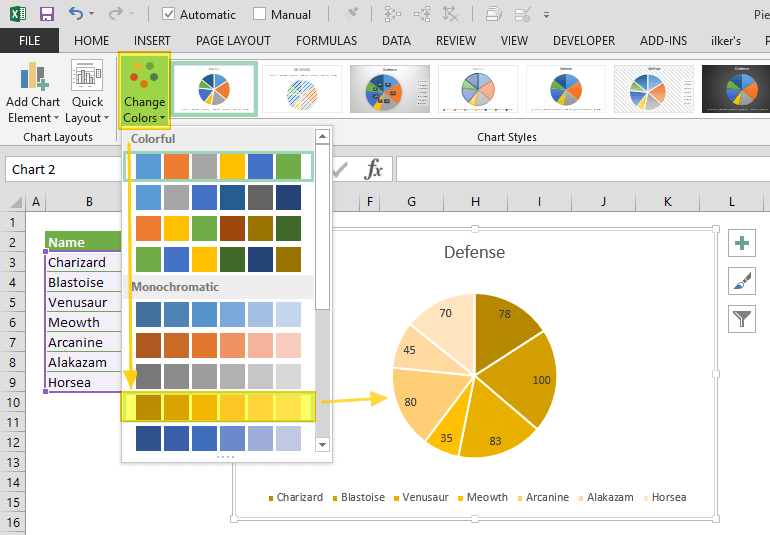
Click on a picture of a pie chart[1] is enormously easier than[2]:
    from matplotlib import pyplot as plt

    # Pie chart, where the slices will be ordered and plotted counter-clockwise:
    Aus_Players = 'Smith', 'Finch', 'Warner', 'Lumberchane'
    Runs = [42, 32, 18, 24]
    explode = (0.1, 0, 0, 0)  # it "explode" the 1st slice

    fig1, ax1 = plt.subplots()
    ax1.pie(Runs, explode=explode, labels=Aus_Players, autopct='%1.1f%%',
            shadow=True, startangle=90)
    ax1.axis('equal')  # Equal aspect ratio ensures that pie is drawn as a circle.

    plt.show()
And (clicking a couple of times) includes: no strings, no integers, no method calls, no named parameters, no numeric formating domain-specific-languages, no libraries, no imports, no tuples, no lists, no braces, no parens, no case-sensitivity, no symbols, no text, no writing, no syntax errors, no saving and running cycle, no having to hold the cell order and positions in your head and count through them to get to Runs[2], no trying to get the image out of the show() popup.
And includes: previews of the available charts, recommended charts, all the styles of chart work through the same UX without having to care how they are named, they popup Wizard dialogs so you don't have to read in advance what parameters are required and what they mean, in-line editing by clicking and dragging to move and resize the whole thing or almost any part of it, change the chart style without having to rewrite code differently, rewrite e.g. axis labels without having to save/run, choosing colours and styles from visual dropdowns, having the chart redraw dynamically as you change the data in the source cells, works in Excel online, works with multiple people having the spreadsheet open, chart is inline with your data in the same worksheet saved with it.
I think a lot of the "problems" with using large scale spreadsheets can be somewhat ameliorated by moving the underlying data to a proper database and then using the spreadsheet as a GUI / interactive analytical tool. Now that you can make external API calls in Excel[1], this actually seems doable.
We are getting pretty crazy with our use of Excel documents these days. With a little bit of OpenXML magic, you can read/write these things from code. I'm not talking about CSV either. I am talking about full-blown XLSX files, where you can control font/color/size/worksheets/et.al. with a few lines of logic.
Once you are able to read & write excel documents with a piece of software, you can do some pretty fucking incredible things.
Imagine being able to click a single button and download a total configuration output for a customer's environment (maybe 20-30 worksheets auto-generated in seconds). You can then email this human readable document to the customer for modifications. You then feed this back into the system to load their adjusted values (there is a diff/check-in report to confirm first).
The reason we and our customers like this approach is because there is a lot of configuration where we need to compare lists of things and slice parts of one thing into another. It makes replicating success absolutely trivial. Being able to style the document is a much bigger benefit than you would probably think at first. CSV is trivial to employ, but it is very constrained on this front. For a developer who is familiar, color & layout doesn't move the needle much. For a customer who has no clue how the back-end works, these things make all the difference in the universe. Things you can't edit are grey background, things you can are green, etc.
Some apps should be spreadsheets.
Some spreadsheets should be apps.
It's the user's decision that's usually wrong. Not the framework in which the solution is built.
For example, at Budibase [1], we've found a high percentage of our use cases are companies upgrading their in-house spreadsheets to applications due to several reasons:
Volume of data
Lack of auditing
Lack of control
Accessibility
I have a love hate relationship with spreadsheets. While in University I was a bit of an Excel Monkey, I knew everything there was to know and I prided myself in not having to use my mouse to make complex models... Now that I worked at a major bank, learned to code and moved to the data science side I despise spreadsheets. Most people don't realize this but out entire banking system is built on a couple excel models that all the banks use - when something goes wrong its a nightmare to fix.
Recently, we've started to see a major shift away from spreadsheet models to spreadsheets being used as data dumps and then being uploaded into third party software. Usually this "software" tends to be nothing more than some SQL and python scripts behind a fancy UI. I would personally prefer the banks to continue using Excel sheets and then pay for their employees to learn basic python and SQL but that's too simple and the SaaS sales guys have their claws firmly embedded in the upper levels of most orgs.
Spreadsheets are the original low-code/no-code platforms! There's something magical about showing a non-coding subject matter expert a few Excel tips and watching them subsequently visualize and automate a process on a spreadsheet. Also, looking at spreadsheets built by non-coders is a great way to spur software/start-up ideas.
Every CRM starts with a spreadsheet or every applicant tracking system starts with spreadsheet. Many organizations love to start with spreadsheet and then evolve to application (Ready or custom).
At https://www.dronahq.com we support
1. users to connect to their spreadsheets and build applications on top. or pull data from multiple datasources e.g. spreadsheets and support ticket system and build custom tool.
2. We understand people love columnar database like spreadsheet or airtable.com, hence we offer an built-in database called 'sheets'
3. We support most excel formula and functions for binding data or writing complex business logic i.e Logical Functions, Date and Time Functions, Text Functions, Math Functions, custom functions
Spreadsheet programs are incredibly powerful. I was a math education minor and one of the classes I remember most was using computers in the classroom and using spreadsheets to do things that aren't obvious like estimate square roots. (well at least not obvious to me)
However, I think spreadsheet programs are still way to complex for the vast majority of people. So many people are so math phobic that they won't even think of opening a spreadsheet.
One thing I've done with a spreadsheet a few dozen times is take the outputted CVS file my learning management system gives me in the form of last name, first name and convert it to first last in one cell. I still have to find the bookmarked answer I found years ago and cut and paste it in and I don't really understand how it works.
Spreadsheets are broken. It's easy to be at error due to calculation issues, which you'll only find out when manually going over it. It's a calculator that can't properly calculate. Many business have made huge mistakes due to it.
At Stacker (YC S20) we do something kind of in between, hoping to catch usecases where people need an actual app just as they are outgrowing the spreadsheet, by allowing you to build an app... from your spreadsheet!
It should be interesting for anyone who's done a lot of thinking* about the relationship between spreadsheets, no code, and custom software. Check us out: https://stackerhq.com
* if this is you, and you're really interested, we're hiring. Email in my profile :-)
Do you guys have a roadmap on Excel support? I’m afraid I’ve never worked anywhere (or met anyone in real life outside of K-12) that used Google Sheets, and I don’t think I’ve ever seen anyone use Airtable in real life either. (This is most likely because I’m on the east coast and am mostly interacting with big company people where it’s extremely uncommon for GSuite to be the office tool of choice. That and I love Excel).
For what it's worth, I've now seen a couple times where the spreadsheet becomes too large and somebody hooks the spreadsheet up to a database so it does queries. That seems to work well for the users willing and able to learn some SQL, and it confuses most others which results in some really strange spreadsheets...
So Alan Kay was right about live coding, at least for the average person, but he was wrong about what kind of software. That or SmallTalk with spreadsheets would be the killer low-code app. Lotus Notes also made use of @ formulas for it's forms, and then there was Hyper Card for easily building GUIs.
Spreadsheets are incredibly powerful tools, as they support reactive programming natively.
The main problem is when you embed a table in a sheet and use it as you would in a database. It is far too easy to overflow the maximum spreadsheet size, or overwrite data... or worst of all sort some but not all of the columns.
I guess it depends what you mean by "spreadsheet lovers." I use Google Sheets but I mostly just do tracking with maybe a few hundred rows and very few formulas.
It's the interface: a grid of editable cells is incredibly easy to use and as almost as information-dense as possible.
It's interesting to see non-excel/google sheets products use the same interface to good effect. Examples don't come to mind but I'm sure there are some.
This is a valid point! Anyone who has built an admin dashboard knows that the UX of being able to edit any field in any row on an Excel is hard to replicate without additional edit buttons and dialogs popping up.
Agree. Also hard to beat the ability to create pretty reports as well. This is why many financial forecasting systems have connectivity to Excel to allow for the creation of reports.
Spreadsheets are good for one thing but they are the handy hammer that seems to work for many other things. I would love to see an open and extensable table/matrix program that would surplant the spreadsheet applications.
Plain sortable tables are underused. Markdown tables are horrendous for example (CSV blocks would be better). Having formulas as well would be amazing, but let's not ask for the world.
When contemplating shifting end users to something other than spreadsheets, one needs to keep in mind how many spreadsheet users there are and what there motivations to change.
Software engineers who have had to deal with spreadsheets being used inappropriately. Spreadsheets are an extremely powerful tool, but they have limits. Their accessibility is part of what makes them so ubiquitous, but it also means people get comfortable and start using them beyond their limits.
Spreadsheets (Excel ones in particular) are great and presenting tabular data and they're mediocre at most other things including crunching numbers, taking notes, storing computational data, providing user interfaces, and much more. It's often okay to use a sub-optimal tool, but you have to draw the line somewhere.
A recent HN post[0] highlighted an example where Excel was being used to keep track of large-scale contact tracing data for covid in the UK. Excel is a mediocre database. It has hard limits on cell sizes and row/column counts among other things. They ran into one of those limits and lost track of 16K positive cases because of it.
From my own experience, I've had to deal with repositories containing tens of thousands of Excel spreadsheets. They were used to capture verification data. Excel files are large and difficult to parse with scripts, which was bad enough. But the worst part was that Excel doesn't really have a syntax or schema, so users editing the spreadsheets would frequently create changes to the table layouts which would have to be accounted for as edge cases in scripts. I'd be lucky to even recover data from half the files using automation. I even encountered one Excel workbook with over 300 tabs!
Every tool has limits and it can be frustrating working with popular tools when users fail to recognize those limits. I love working with Python, but I'd never try to write a kernel with it. Likewise, there is a time and place for spreadsheets.
I do – but I'm an academic, not a software engineer. Spreadsheets are abused and don't make a formal distinction between analysis and data. I've seen many horrible, horrible things happen because people used Excel when they really, really shouldn't have. Intelligent biologists reinventing numerical integration (badly) in Excel, for example (with huge floating point errors, often comparable to the size of the change they are looking for biologically).
The post is probably something of a straw man. I think the "hate" is mostly about spreadsheets being used as effectively hard to audit spaghetti code for for tasks that would be better coded in some Python or R.
I've probably never been a real spreadsheet power user (though I've had some pretty big ones). But they're hard to beat for any sort of semi-structured tracking.
I sometimes wonder if spreadsheets as we know them were sort of an inevitable outcome of personal computers. There were some alternative takes early on but they never took off. It's also sort of interesting to me that some other tools in the same general space like databases on PCs sort of withered away.
It is a straw man. Software engineers don't hate spreadsheets when they're used as spreadsheets, like this article describes. They hate the "spreadsheet as a database," particularly when they're asked to load those spreadsheets into a proper database or other system periodically. Spreadsheets are so easy to use for tabular data, and since technical and non-technical people alike can easily use them, it's a tempting data transmission protocol. But most non-engineering types aren't disciplined about the layout, or understand the intricacies of interpreting the data (e.g. putting labels into numeric columns, adding accidental spaces to the end or beginning of labels), leaving the engineers to constantly rewrite sometimes complex scripts to load new data in this month's "flavor" of spreadsheet.
I do not think the point is software engineers hate spreadsheets. Software engineers would approach their use of spreadsheets very differently than a financial analyst. I think the point is software engineers hate inheriting spreadsheets that are developed by others who do not use a more sophisticated developer approach
That software is Microsoft Access. Trouble is it's not updated much anymore, and it comes with Excel and doesn't need Corporate Approval, so it has a gigantic moat compared to other competitors.
There's tons of room for improvement, but it will be extremely hard to break in.
Article covers a great point, just does not provide a framework to make decisions regarding when to use spreadsheets.
I am a CFO that has used spreadsheets my entire career (30+years). They can definitely have a vital role in any company and can also cause incredible problems.
A few thoughts that were not mentioned in the article:
   1) in many companies the users of spreadsheets are not allowed to use anything more powerful than spreadsheets (or maybe MS Access which causes more problems).  To get a SQL/Python (or other programming language) solution requires submitting a request to IT and then waiting two years to work up the priority queue.  This is not a complaint against IT and the priority process.  The reality is most spreadsheets do not start out as important enough to warrant high priority.
   2) Spreadsheets are great containers.  Not only can they hold a model, but also the raw data, and even emails regarding the model/inputs/etc.  This makes them very handy for keeping everything in one file regarding an analysis.
   3) IME, most significant spreadsheets get rewritten as they evolve, especially when they change hands.  This is both good and bad.  While the rewrite allows correction of built up badness, it is rarely done with the discipline one sees with refactoring in more traditional code.  Moreover, when a hand off happens, the rewrite is generally done because the recipient does not fully understand how the existing model works.
   4) Large spreadsheets cannot be effectively audited outside of locking/password protecting non-input cells. Very rarely is this actually done.  As a result, you get the scenario the author describes of hard-coded values in cells that once contained formulas.  These are almost impossible to find in worksheets with large numbers of tabs and thousands of formulas.
  5) Spreadsheets generally do not use true version control.  For most of my career, one simply used "File Save As" to create a new version.  In the early days it was due to a fear Windows would crash and you would lose your work.  Later, it became a way to step through changes and determine the impact of the change.  While this method provides some ability to go back to a prior state, people really do not track properly what each version contains and what are the true differences (would love to find a way to use Git effectively on spreadsheets).
   6) Most spreadsheets do not have test cases.  They certainly do not increase the test case universe as modifications are made.  As a result, cannot tell if things break when changes are made.
Given all of these things, I recommend using spreadsheets for ad hoc analyses and to pilot analytics that will become part of a routine process. The latter point is the point the author is making (and the point of his title). I would add that the analysts need a plan and methodology to determine when they need to convert from the anything-goes freedom of spreadsheets to a more disciplined, maintainable, controlled program.
I agree with this one. People who don't know how to code can easily use spreadsheets in your everyday life. For example, to calculate your income and expenses. To track and monitor your finances.
I wonder how many bankruptcies could be avoided if more people just had some basic spreadsheet literacy.
Before I bought a house, I built a stupid simple model to understand what my monthly expenses would look like. What you get an appreciation for is that very quickly you can go from comfortable to precarious with just a few additional fixed expenses (childcare, a new car, a boat).
Without laying it all out and seeing how your numbers change, it's hard to get a visceral appreciation for your finances.
Spreadsheets can be extremely powerful for what-if analyses. They can of course also be abused in that respect, especially in a business context, where complex spreadsheet models can get conflated with reality.
My problem with this is that if you can learn to use excel you can certainly learn to code. It's no harder. A given article for a given task in either is going to be like a 5 minute read.
=SUM(A1:A10) is no easier to do than sum(data$column). Why are we educating generations of excel users instead of generations of R and python users in undergraduate business programs? It seems so wasteful of young educated talent to learn how to do the same thing with such limited software, if its no harder to learn a general purpose software like python or R and do that same thing plus infinite more things.
Spreadsheets are a great way to introduce coding to someone because the variables are visible - it's not some esoteric concept of memory and pointers, it's just whatever is in cell A3.


For example, Excel would be a lot more usable and maintainable for me if there was a way to make a special "data sheet" in which data types are forced to be consistent within columns and there was a concept of column names. Still GUI-based and user-friendly. That would encourage a logical seperation between data entry, data output, and computations. In my experience, the main challenge of helping users with spreadsheets is when they create spaghetti code that mixes data and computation together.