So to summarize, 6GHz offers a wider frequency range, allowing for more wider channels, and is not used by anything else. As long as WiFi 6 is the only thing using the specific frequency band the AP can assign devices timeslots for both sending and receiving, improving both performance (fewer collisions) and battery life (no need to keep the radio on outside assigned timeslots).
Basically, because WiFi gives an equal opportunity (sort of) of transmission to all devices, old devices or devices far away will slow down the network for fast devices as they will take a big amount of transmission time because of their lower transmission rates.
Greenfield was already a try at "ignoring" old devices but never really took off.
It's also a lot more line of sight, and easier absorbed in concrete and more dense construction materials (think rooms away with layers of wood and drywall).
2.4GHz = 5 in
6GHz = 2 in
The inches are the wavelength height from base to top... Meaning that's pretty much what it can get around without impeded.
Wavelength is not a height, but the distance between between points of the same phase in the variation of the propagating electromagnetic field.
Propagating EM fields are adorned and reflected with multiple effects. Light is electromagnetic fields with a wavelength of ~ 100s nm, yet it can pass through glass, but not a thin sheet of aluminum foil.
5Ghz gets blocked by the thinnest brick walls. We all live in castles in Europe so 5Ghz practically only works line-of-sight. Makes it pretty expensive and cable-intensive to deploy [well] in a large building.
It's also disheartening when a new standard comes out and device manufacturers flock to replace all their old single-radio, single-antenna devices with shiny new... single-radio, single-antenna devices. Wave2/MU-MIMO should be a base requirement.
Is there any progress on improving longer band wifi? Ie sub-2.4GHz, or 2.4GHz coordination between masts so devices can actually roam well?
Single antenna devices make sense for a lot of small/low power devices. Not to say manufacturers don't just cheap out sometimes though :).
802.11ah (2017) would be your most likely bet for low frequency in the short term. I have a 5 year bet going with another guy in the office that he won't be able to get a client and an AP with it by 2022 (i.e. he thought manufacturers would jump on it, I thought it was going to fizzle and 6/24/60 GHz would have the hardware action). So far it's looking like I'm going to win that lunch. There is also some talk about refreshing the 3.7 GHz space but I'm not sure that'll happen and if it did it'd probably be a ways out before real world impact (if ever).
As far as improving 2.4 all of the roaming standards improvements work in it and Wi-Fi 6 works in it. It's really no different than 5 GHz/6 GHz in that regard it just has a bunch of shitty legacy clients to compete with which is amplified by the fact it penetrates farther.
> 802.11ah (2017) would be your most likely bet for low frequency
900MHz is pretty nice for the 1-10mi range (this is what I do for my day job), but it never really made sense to me as part of the WiFi umbrella for that reason. Its also got a bit of a chicken/egg problem - without the correct antennas and chipsets in devices, its useless in an AP and vice-versa. 2/5Ghz have been around since 802.11a/b days, so continuing to iterate on those bands makes more sense.
Curious what you work on in the 900 MHz space :). I come from enterprise Healthcare so it's mostly about connecting very new consumer type devices and very old pieces of shit.
I think the 802.11 group wanted to offer low to mid speed Ethernet/IP + traditional wireless security managed the same as the rest of the devices which makes some sense I just didn't (and still don't) think the types of devices using 900 MHz care about fitting in that mold enough to adopt.
Pretty much everything 900 MHz has the chicken and egg scenario on hardware/protocol right now so I didn't/don't count that in my reasoning. There's not really a single protocol that has a large number of products deployed in a large number of verticals where you can safely say "we'll just attach to the existing 900 MHz radio at the customer site". Some protocols at some verticals yes but not enough that choice is locked in due to chicken/egg blocking changes.
Overall though while 802.11 is going to continue iterating 2.4/5 they are heavily interested in offering Wi-Fi in basically any unrestricted frequency. Moving extremely high bandwidth things to 60 GHz, moving low bandwidth things to 900 MHz, moving new clients to 6 GHz. They've come to realize they can come up with the coolest protocol in the world but there is only so much you can do with the 60 MHz of space in 2.4 when devices with wireless N chips are still being sold. There are even talks with hardware vendors looking at interest in the 50 MHz of space in the 3.7 range for things that should be 2.4 but 2.4 is too crowded.
.
Edit: I just realized out of all of that babbling I never said why I didn't think 900 MHz Wi-FI would take off. They made some protocol changes to make it reasonable to use at low bandwidth long range but not enough. That combined with the desire for long range Wi-Fi itself already being niche almost guaranteed hardware manufacturers weren't going to be very interested. I think there was a company in France that actually started sampling some AH hardware but it's only partial spec and very low bandwidth.
I worked briefly in the radio group at Trimble Nav Ltd. around the DotCom times.
900 MHz and VHF CB bands didn’t have great channel bandwidth but sure worked well at a distance. 2.4 GHz was marginal but useful just like as it’s used for WiFi. 5+ GHz is/was basically useless... and 802.11/A proved that out. GPS and other satnavs use the L-band 1.2 - 1.6 GHz which is a very sweet spot for many applications. Cell phones use/used 450, 800 MHz through L-bands, which makes sense.
5G is being deployed in bands (24 - 71 GHz) that are implicitly trying to sell as much equipment making the deployment as expensive as possible and/or going to waste an enormous amount of energy trying to overcompensate for their horrible spectrum utilization. I predict 5G will die, not because of unfounded conspiracy theories, but because carriers will realize it’s too expensive and users will balk at $400 USD mobile bills to fund this pointless adventure. I suspect they’ll be forced to redo or abandon the emperor’s new clothes when they’re discovered to not be a substitute for a winter coat.
I'm a radio technician, not a hardware or software engineer. Most of our customers are things like water/wastewater districts, utility companies and assorted state and federal government projects (people who can afford $1000 radios and need them to be rock solid for 10+ years). Its not all super exciting work, but we do get the chance to work on some pretty interesting stuff on occasion, and designing radio networks can be pretty rewarding.
Agree with you on the lack of protocol compatibility - I think its seen as an competitive moat of sorts, but it can make it difficult to get into existing systems due to the need to essentially rip and replace existing systems. Unfortunately, vendors are also terrible at being compatible with their own legacy products due to the use of fixed function chipsets, although that is changing with the move to SDR.
My email is in my profile if you want to reach out.
It's actually useful in high density environments to have wireless signals absorbed. Say you're in an office: there may be 3-10 wireless devices per desk. Have those signals reach an access point and then die is a good thing. Another scenario is a stadium. It's best that communication doesn't propogate or reflect or nobody will be getting a communication line.
I understand that not being backwards compatible means new wifi 6 devices can take better advantage of improvements, but it will also probably be a bit of a mess for years while millions of legacy devices muddle on, and years even before manufacturers start making wifi 6 capable hardware the default.
Not only that, there's a reason many (most?) smart home devices still only support 2.4ghz, (range, particularly through solid objects I think) and I don't think that is going to change.
Or are we going to be stuck with wifi routers that have to implement ever wifi protocol?
For a pretty long time I disabled 802.11a/b/g on my AP. All devices on my home network must support 802.11n or better. It isn't really an issue because 802.11n is actually really old. IIRC the presence of older 802.11a/b/g devices will cause throughout to decrease for newer devices as well.
Late last year I also stopped providing 2.4GHz for my home network. The only inconvenience so far is just a wireless printer not supporting 5GHz, so I have to print using a USB cable.
The level of inconvenience would surely be different for everyone, but in my case it's worth it.
In some countries there are no 5ghz bands that don’t legally require DFS (which can kill your network for 30 minutes or so when interference is detected) and out where I live 5ghz usually doesn’t make it across half the house (land is cheap as crap and everyone builds crazy large houses on it.)
I have to wonder what you’re even doing that needs 5ghz, I guess you’re in the city and trying to escape interference?
I currently have several devices that are 2.4 only, so I'm stuck. The wireless printer I can probably work around if I move it out of the closet, but the wife won't let me and I love my wife more than I love wifi. There's also two game consoles, an iPhone 4, an egg minder, an e-book reader, and an iLamp on 2.4. Probably some other stuff I don't remember off the top of my head.
For me, it would be nice if all AP's had the same power level. Currently the neighbor across the street and two houses up is putting out so much power that it drowns out my AP two rooms away.
> Currently the neighbor across the street and two houses up is putting out so much power that it drowns out my AP two rooms away.
Give your neighbour a dose of their own medicine: Get a directional high db antenna, set a spare WiFi AP to the same channel, and point the antenna at your neighbours house. Then set up a looping script that copies data to constantly saturate that AP.
Not that I've ever done this, or advocate anyone actually doing it... ;D
Unless actual malice is involved, the neighbor will probably just wonder why the wlan is shit and buy a "better" (stronger) one. Sounds much like a good old coordination problem to me.
Unfortunately, 2.4ghz is still pretty much the only option for something like a smart lightbulb or smart plug. For the printer though, it seems like either the printer software or my router is smart enough to talk to it even though my PC is on the 5ghz SSID. But the same can't be said of the bulbs and plugs. I had to return a bunch and swap for Amazon echo smart plugs, which are also only 2.4ghz, but the echo itself is smart enough to work with them even though it too is on the 5ghz said.
Possibly from a “BETAMAX” features point-of-view, but it’s not as pervasive as WiFi (“VHS”).
My front door lock is Zigbee only because a WiFi camera is its WiFi-to-Zigbee bridge. Everything else is WiFi.
Maybe in the future smart home stuff will convert over, but then it means one company or another will have to sell a bridge and be the gatekeeper. Perhaps the home/ISP-provided access points should include Z-Wave / Zigbee that is open to provision and configure from FAANG’s and smart home products?
802.11ac's ("WiFi 5") core benefit was (with enough antennas) running channels on both 2.4GHz and 5GHz and supporting devices duplexing across both channels for maximum speed/latency shaping. It made running 2.4GHz cool again, and from what I'm aware of finally solved some of the compatibility issues between 802.11a/b/g and 802.11n so that there are fewer issues with older devices.
My impression from school ages ago is that though 802.11a botched the original plan and took years to fix while 802.11b captured the market, and 802.11n mostly fixed it right, and even though 2.4 GHz is one of the noisiest bands in the modern home (microwaves, old school walkie talkies/baby monitors, parts of Bluetooth, all sorts of other random home appliances), 2.4 GHz is still the technically superior band in a lot of cases, and WiFi frequency hopping and noise avoidance have gotten really good since 802.11a.
It's interesting me to decide to ban that entire band from one's home WiFi options.
We turned off 2.4 GHz in the office three years ago without notice. This was due to a huge hotel going up next door that seems to have an AP going full blast in every room making 2.4 GHz unusable.
Nobody noticed or complained. And I know we have lots of really old Androids in use by staff.
Quite a few things are based around devices like the ESP32 and ESP8266 which are very much only on 2.4GHz.
I think that we'll begin moving away from that to things having their own LTE-M1 modems in them and a token data service though. We're already seeing that to some extent, where there's hot tubs (literally!) that have their own internet connections to send "telemetries" back to the operator for advertising purposes. From the consumer perspective it's "zero configuration", for the manufacturer it means that "just don't connect it to the internet" simply isn't an option anymore unless you go and tear out the LTE chip.
Routers in most homes and offices have the power budget and physical space to support multiple frequencies and protocols, so there's not much reason to give up backward compatibility unless you want a router that is either very small or very cheap. Of course the 2.4GHz band is crowded, but it won't be so bad anymore when most bandwidth-heavy devices have moved on to higher frequencies.
You can force devices to use 5 GHz by having different ESSIDs for the 2.4 GHz network and the 5 GHz network. A device configured to use the home-5g network won't try to connect to the home-2g4 network, and vice versa.
Tell that to my fridge, which only supports 2.4GHz and which I have no plan to replace in the next 10 years.
Fortunately, the fact that some devices continue to use 2.4GHz does not reduce the bandwidth I have on my other network that is 5GHz. So I have no incentive to disable 2.4GHz anytime in the next 10 years, either.
According to the manufacturer, it sends diagnostic information and receives firmware updates. I'm not entirely sure that it's not snitching on my eating habits at the same time, though.
I wonder how nobody takes this "feature" as negative. My first thought was: "My fridge doesn't need firmware updates and it does what it's supposed to do. What's wrong with this one?"
It's going to require new hardware to support the new frequency so it only makes sense that if you support the frequency it should be required you do it with the minimum protocol version being the one that was around at the time the frequency was introduced.
And yes, tri band routers will be popular as well as switchable dual band routers (i.e. you can flip between 2.4/5 or 5/6 but not both at the same time)
  Wifi Mesquite
  Wifi Mistletoe
  Wifi Kangaroo Rat
  Wifi Roadrunner
  Wifi Rattlesnake
  Wifi Great Horned Owl
That way it's easy to keep track because we just follow the food chain. And with Apple in charge, it will be instinctive to know that Mac OS X Leopard is incompatible with Wifi Minnesota Big Game Hunter Dentist.
But mac os versions all have numbers that go along with them in addition to the name. It's the same system used by the Linux Kernel (i.e. 5.2 / Bobtail Squid), Ubuntu (18.04 / Bionic Beaver), and many other pieces of software. Most of the time the numbers are more useful, but there are occasions where having a non-numeric designation is helpful.
Apple's real naming sin is that they don't enumerate all of their hardware as they do with the iPhone.
On the machine I'm using right now, opening About This Mac shows "iMac (21.5-inch, Late 2013)."
The identifier you're talking about can only then be reached by clicking System Report... and looking under Model Identifier, where it is listed as "iMac14,1."
I think they should turn it over to the people at the Debian project who name every release for a toy story character. Old list I've pasted here, buster is now a stable release.
1.1 Buzz 1996-06-17 Buzz Lightyear
1.2 Rex 1996-12-12 Rex (the T-Rex)
1.3 Bo 1997-06-05 Bo Peep
2.0 Hamm 1998-07-24 Hamm (the pig)
2.1 Slink 1999-03-09 Slinky Dog
2.2 Potato 2000-08-15 Mr Potato Head
3.0 Woody 2002-07-19 Woody the cowboy
3.1 Sarge 2005-06-06 Sarge from the Bucket O’ Soldiers
4.0 Etch 2007-04-08 Etch, the Etch-A-Sketch
5.0 Lenny 2009-02-14 Lenny, the binoculars
6.0 Squeeze 2011-02-06 Squeeze toy aliens
7 Wheezy 2013-05-04 Wheezy the penguin
8 Jessie 2015-04-26 Jessie the cowgirl
9 Stretch 2017-06-17 Rubber octopus from Toy Story 3
It is possible for something to intentionally have a double meaning.
Given the overall naming convention I'd actually hazzard a guess that Sid the ToyStory character was the initial reason for the name and Still In Development is a backronym.
They haven’t all been great though. How one says ‘X’ in the Apple ecosystem has always been trouble, and they seem to repeatedly fall into that trap.
There is also the weird pleuralisation issues they have (iPhones 7? iPhone 7s? How do you pleuralise the iPhone 7S?). Some of the releases shared a name too, like Mountain Lion and High Sierra (which were great so are forgiven).
But don’t forget that the WiFi Tokyo Drift version actually fits in between two later versions and it’s up to you to figure out where by carefully examining which characters are present in the documentation of each version.
Naming can be hard when a new product is not a direct replacement/upgrade of the previous one but more of a fork which might include a premium/cheap version.
Sticking to incrementing integer major revision may not be as much fun, it makes ordering much easier. Case in point, a roadrunner hunting a rattlesnake: https://www.youtube.com/watch?v=YwLspcdm0Bs
I own some Apple hardware but I couldn't tell you the order of OSX/MacOS releases off the top of my head. It's something only brand enthusiasts memorize, while every school child learns the ordering of integers.
To be fair, the IEEE standards are very easy to order, the letters sort the same way excel columns do: a-z, followed by aa-az, then ba-bz, etc. Sure, they skip most of the letters and I'm not sure if the ordering is entirely intentional, but so far it works.
It's just that they also use letters for clarifications, incremental updates, and in a couple cases tangential committee work, so 802.11 skips so many letters not because they weren't documents but because they were documents that didn't spawn a "new standard" outright. Some of the "in between" letters are used for interesting things, and/or are useful stepping stones in seeing the evolution of the standards that made it to "consumer adoption".
(Hence why it was maybe smart of the Wi-Fi Alliance to disambiguate IEEE procedure from marketing names for consumers, but also why they don't seem to be having much more luck with it than say the marketing names of cellular networks, because standards don't evolve "linearly".)
I'd rather they just use the years the standards were ratified... at least that would be both monotonic and obvious while not risking confusion with the frequency.
Monotonic version numbering is the way to go, and years are the most consistent and best understood mechanism for something with a release cadence such as WiFi or a language spec.
It also gives an indication of whether two things were produced around the same time or not. (Eg. You'd know that Windows 2015 probably wouldn't support WiFi 2019 without support being added)
Now that's just brilliant. It hasn't seen wide enough adoption for this to happen yet, but imagine all the USB standards and processors and whatnot did the same.
That's just so simple it's genius.
"That 2020 motherboard won't run USB 2025"
We really need this.
Please Intel, Broadcom, Nvidia, etc. folks reading this. Please.
It's also really nice for convincing people that things are out of date. It is a lot easier to defend targeting "ANSI C" than it is to defend targeting "C89", even though it shouldn't be.
Except that your 2025 motherboard will run USB 2025, even though it’s the same as USB 2020. The marketing people just didn’t want to write USB 2020 on there.
But since USB won’t actually
Change until 2030 it doesn’t matter, right?
> Monotonic version numbering is the way to go, and years are the most consistent and best understood mechanism [...]. We should adopt this as an industry.
Absolutely agreed.
In the interest of efficiency, we should probably also truncate it to fewer digits.
Perhaps 2.
Since we're in the first quarter of a new century, this won't cause an issue for a long time.
As other commenters have said though, manufacturers probably don't want consumers to have a good idea of just how obsolete their equipment is. The current a|c|b|g|n alphabet soup is working out just fine for selling lots of equipment.
Also, there are likely to be actual manufacturing and engineering reasons why Wifi 2021 will only become widely available during 2024, and those are hard to get across to consumers too.
It can be done in the same way that specifications for consumer electronics currently work. This router supports WiFi Hyper-Speed 5 Super Tough Technology with Ultra Frequency Crystals (R) for enhanced frequency modulation GAMING EDITION ULTIMATE FATALITY RGB.
The rise of this sort of branding is very intentionally to make comparison possible, as you don't really know anything about the Ultra Frequency Crystals and why their competitor doesn't have them, just buy whichever ones have flames and a dragon on the box and it'll work itself out.
The auto industry deals with this by assigning cars a "model year" which is the year after the calendar year in which they start being sold, thus you can buy 2021 cars in 2020.
Consumers that need to know or care can be taught.
The other half or more of the market already doesn't understand the existing versioning scheme. If you print the version in small print on the back of the box, they'll be no worse off. Or simply elide the first two digits and they won't know it's a year-based scheme.
And who's to say they can't do a yearly release cadence? WiFi 20, WiFi 21, ...
I have fond memories from the mid nineties of a compiled xBase language that did this, their dominant version was Clipper Summer'87 — their last year numbered version, their next version was 5.0 and was so bad they lost most of their market advantage — in the mid nineties talking about a product called Summer'87 sounded really bad to me, humorously this was when Microsoft moved from a numeric scheme to years, which itself only lasted from 95-2000 (longer for server releases of course)
> Microsoft moved from a numeric scheme to years, which itself only lasted from 95-2000 (longer for server releases of course)
Their commitment to it even for servers is only half-hearted.
    Windows Server 2003 (April 2003)
    Windows Server 2003 R2 (December 2005)
    Windows Server 2008 (February 2008)
    Windows Server 2008 R2 (October 2009)
    Windows Server 2012 (September 2012)
    Windows Server 2012 R2 (October 2013)
    Windows Server 2016 (September 2016)
    Windows Server 2019 (October 2018)
That works for the version but tells you very little about what frequencies are supported. And it's the complication of frequencies that's hard here, not figuring out that wifi 6 comes between 5 and 7.
It's my understanding that the reason "Windows 9" was skipped was technical, not marketing.
I read (I think on HN) that lazy programmers would test whether the environment was Windows 95 through 98 by only checking for "Win9" or something similar, rather than a list of strings. Thus, if Microsoft released an actual "Win9," many programs would think they were running on Windows 95.
To name and shame at least one example, such code was included in some versions of the Java Development Kit itself and could be found in easy Google code searches at least at the time Microsoft skipped Windows 9.
Microsoft and Apple and others also prefer to skip 9 for the international marketing reason that 9 is a very evil number by superstition in most of Asia, like how some of the west believes 13 to be unlucky and things like elevators tend to skip 13 in the US/Europe.
Telecommunications engineers produce the worst naming schemes and acronyms of anyone, anywhere.
Any cellular document is a mishmash of alphabet soup: UTRAN, UMTS, PS-CN, SGSN, RNC, RNS, eNodeB, EPC, MME, S-GW, X2-AP, S1, GTP-U, HSDPA, HSUPA, RRC, PDCP, RLC, OFDM, MU-MIMO, and on and on ad infinitum.
You'd think the marketing people would at least get the public-facing stuff right, but they've likely been tainted by association with the engineers.
They have though. They added 2G/3G/4G/5G (though some American ISPs like to call stuff the next G even if it doesn't qualify).
There's also WiFi and now WiFi 1-6 (the F is just dumb) and Bluetooth 1-5.
OFDM and MU-MIMO aren't user facing technologies, they can be applied in any wireless standard really. Just because router manufacturers put stickers on their boxes doesn't make the technology customer facing.
Same with the protocols underlying the cellular industry. For all the engineers care, the people just call it by their Gs and be done with it. Cell phone manufacturers tried to advertise with specific technology names because "3G but slightly faster" doesn't sell well. Then the 4G debacle happened where LTE didn't even qualify to be called 4G at first except due to a technicality and now that LTE Advanced is available, which finally is fast enough to be called 4G according to the specification, people are already starting to call it 5G.
I blame the marketeers for ruining any consumer facing schemes by their drive to have the biggest number the first no matter what. As long as people like that end up naming things, we'll never have concise naming schemes for consumers as all simplification efforts are ruined by trying to grab a quick buck.
What debacle? As I recall, LTE was the actual 4G tech because, well, it was a new generation after all the 3G ones. The only debacle I remember was that some carriers decided to call HSPA+ 4G for marketing reasons.
Well, according to the original design specification for the 4G name, the standard had to support a certain throughput in rest (I believe it was 1Gbps) and a certain throughput while moving at a certain speed (something like 100mbps at 100km/h). LTE failed to reach the 1gbps threshold but managed to get the high speed while moving so it was basically declared "4G enough" and people just accepted LTE as 4G. This is why the ITU now has definitions for 4G (LTE at the moment it started being marketed as 4G) and "True 4G" (4G technologies that actually pass the requirements for 4G such as LTE advanced, which AT&T now markets as "5G E" because screw consumers I suppose)
As hilarious as this sounds, it's actually not _that_ bad. It doesn't seem like 6E is a completely new standard so much as it is an existing standard being used on a new frequency band. In that respect, it wouldn't really make sense to call it "Wi-Fi 7", and the "add an arbitrary letter onto the end of the version number as an indicator of a different variant" naming scheme is already pretty well understood thanks to smartphones doing the same thing for years. (And Ethernet cables, come to think of it.)
I suppose they could have incremented the version number anyway just to avoid the need for that sort of awkward naming scheme, but I'm not sure if that'd be any less confusing. It'd be simpler sure, but also somewhat misleading. In any case, it's still way better than the previous scheme of using non-sequential letters of the alphabet as version numbers.
Have they considered names like Low speed, Full speed, High speed, and Super speed? They are already familiar to consumers who will understand them as well for wifi as they do for USB.
ITU really got it bad here, having designated "Very High Frequency" at what we now consider pretty low frequency (<300MHz). Subsequently stacking on Ultra- Super- and Extremely-High Frequency bands before giving up at Terahertz.
True, but considering how long ago the designation "high frequency" was made, it's understandable. AM was extremely low frequency (~1 MHz), but that was what they were comparing against when they started using higher frequency bands.
AM = amplitude modulation (as opposed to frequency modulation). It has nothing to do with a specific frequency range.
In the United States for example, AM is commonly used from ~150khz all the way up into the low hundreds of megahertz.
As an example, all aircraft transmissions in the US are AM and are in the ~120-130Mhz range.
Thanks for explaining that to me, a licensed amateur radio operator for more than 20 years. :p
I meant the AM radio broadcast band as an example of a popular use case of radio in the early days when the "high frequency" designation was made.
They are extremely low frequency compared to where most radio communication occurs today, orders of magnitude higher. Not literally ELF, which isn't used apart from extreme niches.
> a licensed amateur radio operator for more than 20 years
Every HAM I know would ridicule me if I used such wording as you did, which I feel I didn’t do, maybe your experience is different.
My reply was less in explaining it to you though, but more as being informative to others who might’ve not had the experience and thus could learn misleading information from your post.
(I’m also a licensed operator, but not for as long as you)
AM radio stations in the US are from 530Khz to 1700Khz, so possible. If so, then calling them “extremely low frequency” is a bit of a misnomer, as that band is called “medium frequency” or MF for short. The actual ELF band is 3-30hz, 4+ orders of magnitude lower frequency, and is mostly only used for submarine communication as most higher frequency signals are filtered by water.
My point is that the basis for the designations were made in a period where AM radio was the primary use case for radio and so frequencies higher than the AM radio band are called "high frequency," whereas today those frequencies are actually much, much lower frequency than nearly all forms of radio communication.
The name MF/HF/VHF etc were defined by ITU v.431 originally in 1953. Amateur radio operators in the 1950s commonly were using “shortwave” frequencies (now referenced as HF commonly). As it’s been told to me from multiple operators in that era, the naming scheme used by ITU for each group is based on the amount of bandwidth available in each group, not based on any presumption of AM radio broadcasts being used as a baseline.
Same issue happened with the naming of silicon development. Thankfully, it seems naming was largely over after "Very Large Scale Integration" (VLSI), having given up on the next generation name: "Ultra large scale integration", but after surpassing "large scale integration".
I don't even know why they do it... I was looking at dishwasher liquid the other day, wondering why it needs all that advertising on it. "New formula!" "Plus Ultra Action!" "Now 20% more effective!" "5% Free"... I'm just buying it for my plates and stuff, gee :D
Reminds me of TVs which I was just shopping for recently. You have your standard old high definition, ultra high definition, high dynamic range, quad high definition, quad resolution, quad full high resolution, etc...
Why is this? Is it standards body politics where new standards don’t want to step on the toes of whoever made the previous standard? Like WiFi 7 might imply that WiFi 6 isn’t good enough any more?
Serious question - is there any reason why naming things with consecutive simple numbers isn't the best approach?
WiFi 1, WiFi 2
...
MacBook Air 1, MacBook Air 2
...
MacOS 10, MacOS 11
I know some of these are already named this way, they're just examples.
Using the year would also be a good (or even better) approach, as it gives you two pieces of information.
I understand that it may not be the best marketing approach, but it would make life so much easier for consumers - if I need a new anything I want to know exactly which is the latest, if I look at second hand items I want to know how far behind it is quickly, without requiring extensive research.
When buying an iPad for instance it took me ages to figure out how far behind the models I was looking at in eBay were...
That is what the WiFi Alliance is trying with WiFi 6. They just have the baggage of the old names (802.11a/b/g/n/ac) to deal with. (It is a lot of baggage. Everyone can agree that n/ac are WiFi 4 and WiFi 5 respectively from a consumer standpoint, but between a/b/g there a lot of interesting debates on how you can possibly number any of them 1-3 in any order for both technical reasons and consumption reasons.)
This story is interesting because even in trying to keep to consecutive single numbers, the WiFi Alliance hit a detour in the consumer expectations. "6E" doesn't make sense as a "6.1" or a "7", but still needs to be differentiated from "6 only" to sell it to consumers.
In general, higher frequency means greater attenuation, which means greater power loss when passing through objects. It's a lot more complicated than that depending on the frequency and medium, so don't take that as an absolute rule.
Indeed : radio transmissions follow Friis equation [1] -- power decreases by the square of the frequency (same goes for distance). So, going from 2.4 to 5 GHz cuts the received power at a certain distance by a factor of 2 (more or less). Assuming free space, of course : obstacles will make matters worse, depending on frequency, thickness and materials.
Meaning that going from 5 GHz to 6 GHz will decrease the range by a factor of around 1.2
Take note that Friis transmission equation is extremely misleading, since it makes certain assumptions about the choice of antenna, which are not necessarily true for all systems.
Too ask the pointed question: Why would propagation in free space be affected by the frequency of the field?
As you note, it's only true when you assume free space. In practice, you have air, you have obstacles, you have earth curvature, you have […], which makes it wrong, because athmosphere has an opacity that varies with the frequency (or wavelength): https://en.wikipedia.org/wiki/File:Atmospheric_electromagnet...
Sat down, took a deep breath, sigh, wrote some rant, deleted that and rethinking now, it is actually pretty good marketing.
All Date are products ( expected ) on the market,
WiFI 6. - 2019
WiFi 6E - 2021
WiFi 7 - 2023
Basically every two year you have a new marketing name to sell. Which is a lot easier for consumers and sales people. Since you need to go through FCC certification for using the new spectrum I assume the likelihood of having your existing WiFi 6 client and router upgradeable to be extremely unlikely.
Then there is 802.11ax / WiFi6 Wave 2, which is similar to 802.11ac / WiFi 5 Wave 2 if anyone remember, with additional features that was originally missing from the wave 1. On top of my head they were mainly features related to UL MU-MIMO. I assume those might come with WiFi 6E too.
And none of the current WiFi 6 on Smartphone supports 160Mhz Channels, so WiFi 6E is another possible candidate to include that on a Smartphone. Another selling point to push for upgrade. ( I am not saying consumer will upgrade because of that, but at least there is one more point to think about what they have now is old, and requires upgrade. It is important to note consumer here implies normal people who are not tech-savvy )
My beloved NetBSD running WiFi 5 / 802.11ac AirPort Extreme came out nearly 7 years ago and it is still working near to perfection. Had always been planning to upgrade it once a WiFi 6 version comes, but unfortunately Apple discontinued it. But the stubborn Apple changed their mind on Keyboard, may be they will do that too for Airport.
great time to buy devices supporting Wi-Fi 5, because of Wi-Fi 6 devices arriving in the US market.
But I say that with some sarcasm, because it's actually a bad time to buy Wi-Fi 6 devices, as Wi-Fi 6E was just announced.
Wi-Fi 6E will require new hardware to support the new frequency - as stated by a previous comment.
BTW, The Wi-Fi Alliance's naming schemes are confusing and poorly timed (Cellular carriers are pushing 5G..and they launch 6E??? Will they bring out 6F and 6G next year?)
You might get a modest performance improvement. Wifi 6 makes use of multiple antennas to better spatially separate ACKs and other upstream traffic from multiple clients even when the packets temporally overlap. The extra bands may also come in handy but some of them may be attenuated by walls and other building materials.
802.11ac is already capable of 400Mb/s or so. So you'd need a link faster than that, plus devices which have Wifi 6 AND can push/pull data that fast and do something with it. For most folks that's a no, so far.
True, but I was speaking in practical terms. To get that 400Mbit you need to be within a few feet of the AP typically. Plus, if there are several concurrently streaming devices on the network you won't achieve the theoretical aggregate maximum throughput. A good rule of thumb in WiFi marketing is to divide whatever throughput the retail box claims by 4 to get the practically achievable throughput. Meanwhile wired networking (the OP's upstream connection) actually delivers the marketed throughput.
802.11ac is actually capable of over 3Gbps, though 4 stream devices are pretty uncommon. 2 streams @ 80MHz is pretty common though, and that provides 867Mbps (max link rate, actual throughput is of course lower).
If you own a house, you definitely have money for a wifi setup with multiple APs - like Ubiquiti with three APs and PoE switch and dedicated gateway - I'd love to play with that, but I'm not going to buy a house to do that.
And for people living in apartments, where every apartment has their own wifi network, less penetration is really a good thing, because there's less interference from other apartments.
If you have nice, solid walls, the signal will mostly bounce off them and pass through doors.
It will usually pass a single wall, so you will hear some first-degree neighbors, in some places, but it's significantly better than interference from 2nd degree neighbors.
Am I the only one concerned about the impact on health? A higher frequency is generally worse for living organisms, and personally I don't need a higher speed than 4Mb/s


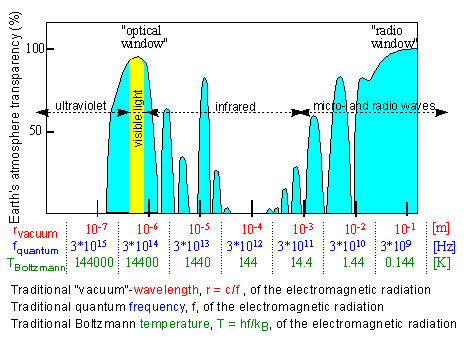

https://blogs.cisco.com/enterprise/wi-fis-new-6ghz-spectrum-...