An E-ink digital photo frame you could reprogram and that ran on batteries with a long life would be nice. Vikaura announced one in 2015, collected money for a way oversubscribed Kickstarter, and then didn't ship. They're still taking pre-orders with a ship date of August 2016. They last updated their "news" on Feb 04, 2015, when the Kickstarter was funded. Looks like they took the money and ran.[2]
Their address was 566 Alpha Drive, Pittsburgh, Pennsylvania. At that address now is a new startup called PowerHarvester. Hm.
The major problem is that colour e-ink displays don't seem to exist - the nearest is http://www.eink.com/display_products_triton.html , which is a monochrome display with a TFT overlay to add the colour.
Way too much.[1] $4700 for a 32 inch color E-ink display right now. $3600 for black and white. $1000 for 13 inch b/w. Everything bigger than e-reader size seems to be insanely expensive.
Vikaura is owned by Powercast Corporation which dates back to 2003. Their primary business is making devices which use RF energy to provide DC power to low power devices - PowerHarvester is one of their products.
From the photos it looks like the display panel is driven by a Raspberry Pi. Adafruit makes it relatively straightforward to build the hardware part [1], now all that's left is the software that processes the audio and displays the visualization.
The panels are from adafruit - there's 4 32x32 panels so you need a beefy PSU to power them.
The visualizations listed there are:
1. an STFT (this is simple to compute - look @ numpy.fft.rfft
2. an energy based vis - light up n pixels where n is proportional to the energy of the frame (this is the integral of the function squared).
3. another energy based vis where if enough energy accumulates particles fall (acceleration proportional to energy).
The code's super kludgy; I'll release it once it is cleaned up.
Elderly people love, really enjoy, their Nixplay[0]. I call it "Facebook[1] for grannies". Putting the names of people below the pictures helps people with mild forms of dementia to repeat & remember the names of their beloved.
The Nixplay device is quite good, regretfully the UX of their website is horrendous. And there I see a problem. If someone would build a selfhosted version of "Facebook[1] for grannies" with an Raspberry PI: open source projects are not known for their excellent UI/UX designs.
Time will come, and given the feedback I hear on the Nixplay, I expect that one day we'll have these devices all over in houses of elderly, either connected to a special screen or connected to the TV set.
[0] nixplay.com
[1] replace with Instagram, Flikr or your favorite photos sharing app/site
Yes yes yes. I've had the same experience with Nixplay in that scenario: the device is loved, but the people who love it can never figure out how to load new photos on it.
Part of the problem is that the web UI is as dire as you mention. Another part is that in trying to be helpful, they offer ways to connect the thing up to a dozen different photo services, but the sheer number of choices they present ends up paralyzing non-technical folks who just want to upload a damn photo.
They really need to concentrate on having dead simple iPhone/Android apps that do one thing and one thing only: take photos on your phone and push them to your Nixplay. (Or integrate "Send to my Nixplay" as an option camera apps and the like can tap into, via intents or whatever.) Do one thing really well instead of a dozen things poorly.
> take photos on your phone and push them to your Nixplay.
Good you mention the Apps, I forgot. Indeed the app is quite useless and how difficult could it be to have a Send To action? With an option to add comment, like in WhatsApp.
Indeed, do one thing good and skip the rest or offer one alternative like email. Also focus on a single device per logon with a single watch list. Given the number of complaints on their forums they don't listen and it is just a matter of time for (self hosted) alternatives to appear.
I've been meaning to do this sort of thing for a while, and after reading the comments here, I've decided to embrace the glow from the display when I make my frame. Using a strip of addressable LEDs, you can emit a glow around the frame that extends the colors visible along the edges of the photograph beyond the frame, like the old Philips Ambilight.
Here's one Instructable I found with one idea for an Ambilight clone:
Nothing old about Ambilight, they still make those screens (and now powered by LED's they are better than they ever were). They also integrate with Hue lights as well so that your whole room can react to the screen (which in practice is pretty naff, but if you have an ambilight TV and Hue lights you'll probably try it at least once with Finding Nemo) :)
Not to knock this project, which seems well executed, but I'm always a bit ambivalent about digital frames. Sure it's kind of neat to to be able to have changing images, or at least be able to easily push new images to the frame, but they're always so impractical.
You either have a wire you have to hide, or you have to remember to charge the frame regularly. All that costs energy. Then of course it's always backlit, which seems odd. Do I really want a glowing rectangle on my walls? Not really. It kind of kills the vibe. Perhaps eink would be better, but beating dyed paper is hard.
Clay Bavor addressed that problem using photodiodes so that the picture never seemed brighter than the surroundings. It really helped sell that it was a normal picture.
Displaying a full screen web page on a Raspberry Pi is such a common use case, I'm surprised there isn't built-in support. Something really lightweight based on RISC OS (like NOOBS is) would be great.
I would imagine better performance and a lower boot time. NOOBS boots far faster than Raspbian and still has full networking.
You also get less artefacts if the system is designed for this purpose. You are less likely to see cursors, modal dialogue boxes, crash dumps/notifications, window chrome/frame or other unwanted UI elements. Admittedly, this is more a problem with Windows (for example, BSODs and Windows 10 upgrade pestering). I regularly notice public display screens where something is broken in this way.
Perhaps the latest browsers don't support RISC OS though, which could be an issue for very modern sites. It looks like this idea is for a frame buffer approach so you could render the page in the cloud and just push the resulting image. It would be sensible to have a local cache anyway in case the network dies.
Noobs uses buildroot not RISC OS ( https://github.com/raspberrypi/noobs ). Buildroot has Raspberry Pi configs upstream so it shouldn't be too hard to use it to build an image with a simple browser, Chromium in kiosk mode is probably a good bet.
It depends on where you get your pictures. The 1.6 ratio is close to the 1.5 ratio (3:2) of DSLRs, but way too wide for Micro 4/3's or iPhone's 1.33 ratio. Certainly better than the 1.78 ratio (16:9) of a typical widescreen monitor.
Just mask off some of the display and size your images to the remaining area? Ideally you want the cardboard matting flush to the surface of the screen anyway.
fantastic project! I have wanted to do something like this for a while.. think I will try to copy yours a bit :-)
all we need now are a sensor to turn off/on automatic depending on people in the room or not.
Advanced bonus points:
1) (simpler version), connect to a calendar service, and match photos to calendar. (e.g. you have a visit from your brother on saturday, so show photos of him and your kids that day).
2) (more advanced), use a camera to recognize people in the room, and base photos on these (I can these the perfect host mode, where a perfect host would find photos from the basement and put on mantelpiece before a friend come to visit, making that person feel special).
Does it really have to be such high resolution display? I gather that, as the observer gets further from the display (and this is a photo frame, usually looked at from afar), the resolution gets less and less important.
And sometimes I like geeking out and going overkill with my projects and as a photographer just had to get a high-dpi display even if it's not needed :)
Interesting timing, I actually want to do this with my Pi (but wired). The only thing holding me back is the cost of the display - any suggestions for a cheaper non-touch display?
I have used other displays from BuyDisplay but not their larger panels, however they have a 1024x600 10" panel for <50$ which should work, if you can live with that resolution.
I would be perhaps tempted to instead look for an old Android tablet. If you could get a 2013 Nexus 7 or some 10" tablet with a decent screen it might be a cheaper and easier way to do it. USB power + either some Android app or depending upon the device you might be able to run a different Linux distro on it. Looks like the Linx 10 goes pretty cheap sometimes too.
Thanks for the link! I want something for my desk, so I can try using my old Nexus 4. Maybe I can live with the 5" display since it won't cost me anything
you don't even need to run the gui and do all the greaskmonkey stuff, its overkill. just set up fbida (https://www.kraxel.org/cgit/fbida/) its available packaged in most distros and you can set up the slideshow right through the command line using the framebuffer to show the images. I've built several picture frames this way.
I've wanted to build something similar lately for an always on ... todo list (mostly because I'm trying to make a habit of looking at todo list). I'm looking for some screen with similar size of a bit bigger than 10", with a caveat it has NO backlight. Can anyone suggest a screen like that? E-ink would be even better.
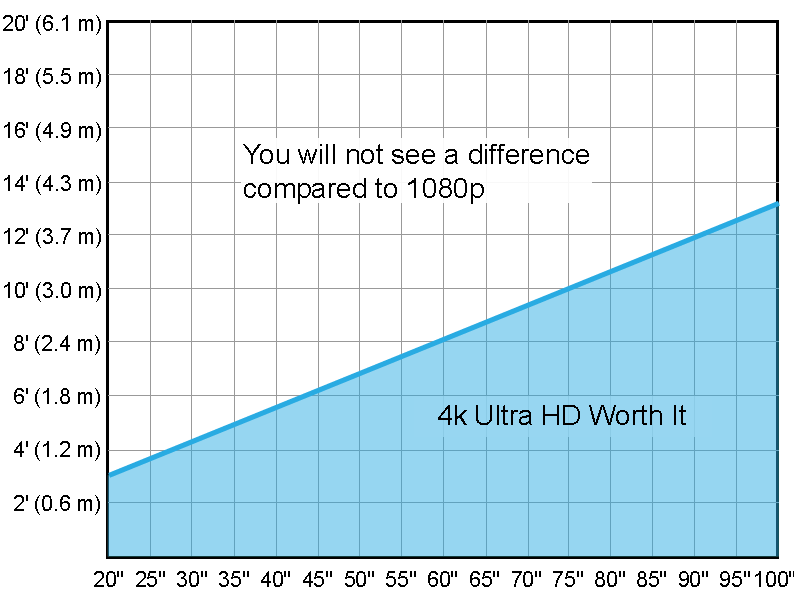
Displays can always be used for other purposes, as well. And, with 4K only being marginally better at certain viewing distances for its price point[0], there is plenty of time where this display can be reused. Most other components can also be reused. I bought a 24" display to set up a RPI gaming rig and now that I don't have time to play with it anymore, I may reuse this display as an "RPI Home Digital Assistant" (future project which I'll probably never get around to implementing).
My only concern is power expenditure - I have minimal knowledge of kWh price of using such a display.
But all in all, some people really like these DIY projects - and others don't. Nothing wrong with that!


Their address was 566 Alpha Drive, Pittsburgh, Pennsylvania. At that address now is a new startup called PowerHarvester. Hm.
[1] http://www.vikaura.com/ [2] https://www.kickstarter.com/projects/1658373341/vikaura-scre...